“Computer Technology Simplified” coaching program that covers a foundational understanding of computer technology for a broad audience is a great way to empower individuals with essential digital literacy.
Here’s a structured approach to help you to understand this program:
Scroll down to view the course contents.
Clear and Achievable Learning Objectives for the Program:
By the end of the program, participants should be able to:
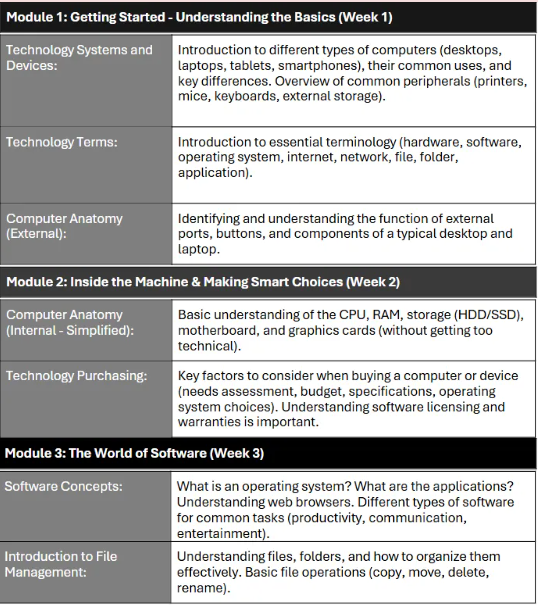
Technology Systems and Devices: Identify and understand the basic functions of common computer systems (desktops, laptops, tablets, smartphones) and peripheral devices (printers, scanners, external drives).
Technology Terms: Define and understand common computer and technology terminology.
Computer Anatomy: Identify the main internal and external components of a computer and understand their basic roles.
Technology Purchasing: Understand key factors to consider when purchasing computers, devices, and software.
Software Concepts: Grasp fundamental software concepts (operating systems, applications, web browsers) and different types of software.
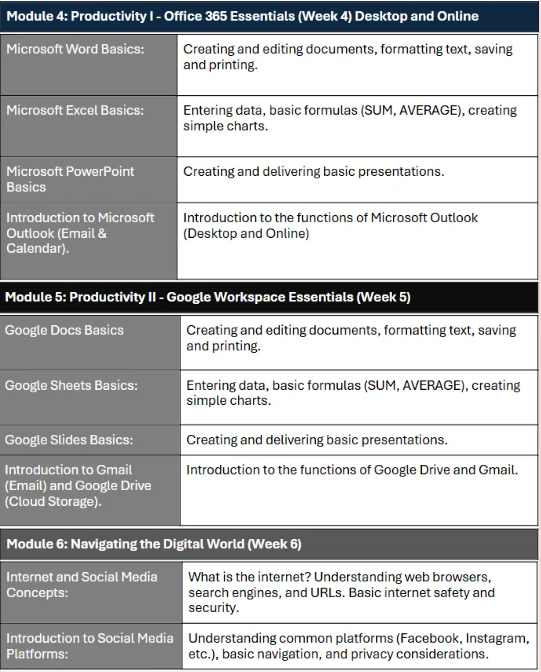
Office 365 and Google Applications: Effectively use core features of Microsoft Office 365 (Word, Excel, PowerPoint, Outlook) and Google Workspace (Docs, Sheets, Slides, Gmail, Drive) for common tasks.
Internet and Social Media Concepts: Understand basic internet concepts (web browsing, search engines, URLs) and navigate social media platforms safely and effectively.
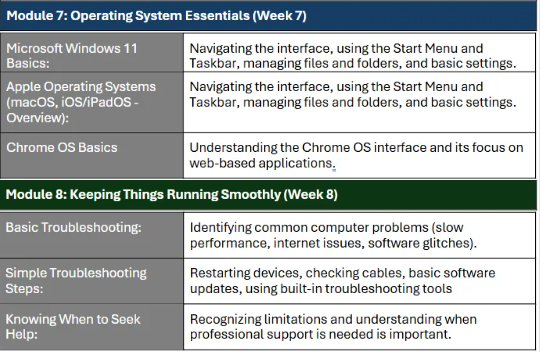
Microsoft Windows 11: Understand the basic interface, navigation, and key features of the Windows 11 operating system.
Apple Operating Systems (macOS, iOS/iPadOS): Understand the basic interface, navigation, and key features of Apple’s desktop and mobile operating systems.
Chrome OS: Understand the basic interface, navigation, and key features of the Chrome OS operating system.
Basic Troubleshooting: Identify and resolve common computer and device issues using basic troubleshooting techniques.